
 Another progress in live path effect, the realtime gear and slant effects. (See the videotheora free format or the samempeg4 version, recorded on an old PIII@800Mhz computer).
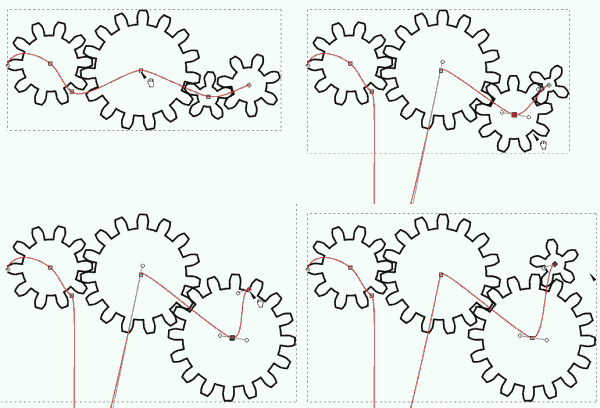 * create a curve
* Press ctrl + shift + 7 keys => open a live path effect little window
* Choose effect (only slant and gears works for now)
* Apply (the path will be transformed)
* Press F2 key to obtain the original curve in red
* Move the red curve and see in realtime the effect.
 Une autre des avancée de la branche live path effect, les roue (gear) et déviation (slant) en temps réel. (Voir la vidéoformat libre theoraou la mêmeversion mpeg4, enregistré sur un vieil ordinateur PIII@800Mhz)
* Créer la curve
* Appuyer sur les touches ctrl + shift + 7 => ouvre la fenêtre livepath effect.
* Choisissez l’effet (actuellement, seul slant & gear fonctionnent)
* Apply (appliquer) le chemin va être transformée
* Appuyer sur la touche F2 pour afficher de nouveau la courbe originale (en rouge)
* Déformer la courbe rouge pour voir les changements en temps réel.