Inkscape 0.44 - Découpe - clipping - 修剪


Clipping rat

(charger le SVGZ) Déplacer le cercle rouge sur le rat
Sélectionner les 2 : (ctrl+A) ou premier + Maj + second.

Activer le découpage :
menu=>object=>découper=>Définir (raccourci clavier : F10, o, é, d)
Et voilà !
Le découpant est toujours l’objet situé le plus haut de la pile.
On peut à n’importe quel moment le désactiver par :
menu=>object=>découper=>Retirer (raccourci clavier : F10, o, é, r)

(Download SVGZ) Move the red circle on the rat
Select both: (ctrl+A) or First + shift + secondary
Activate clipping :
Menu(F10)=>objet(o)=>clip(no short cut)=>set(s)
That’s all!
the upper object is the clipping object.
It can be disabled at any moment by :
Menu(F10)=>objet(o)=>clip(no short cut)=>Release(r)

(下栽SVGZ)移动圆周上鼠
选择两个(ctrl+A) 还是 第一个+shift+第入个
使修剪 : F10=>o=>p=>s
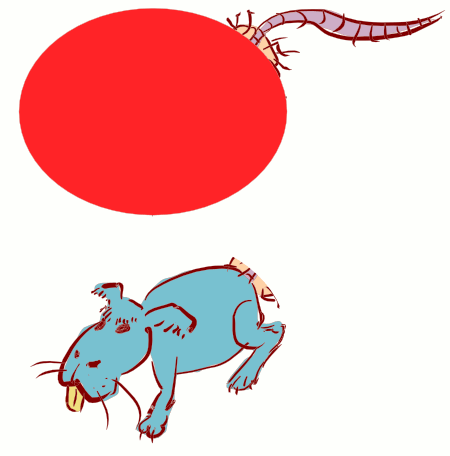
Clipping rat animé

This entry was posted on Saturday, September 9th, 2006 at 2:26 and is filed under Didacticiel, Inkscape, Tutorial, vectoriel, 教育. Find similar posts by selecting any of the following tags: . You can follow any responses to this entry through the RSS 2.0 feed. You can leave a response, or trackback from your own site.

No Comments

Be the first to comment on this entry.

Have your say

This is a captcha-picture. It is used to prevent mass-access by robots. (see: www.captcha.net)

You must read and type the 5 chars within 0..9 and A..F, and submit the form.


Oh no, I cannot read this. Please, generate a

Fields in bold are required. Email addresses are never published or distributed.

Some HTML code is allowed:
<a href="" title=""> <abbr title=""> <acronym title=""> <b> <blockquote cite=""> <cite> <code> <del datetime=""> <em> <i> <q cite=""> <strike> <strong>
URIs must be fully qualified (eg: http://www.domainname.com) and all tags must be properly closed.

Line breaks and paragraphs are automatically converted.

Please keep comments relevant. Off-topic, offensive or inappropriate comments may be edited or removed.