
Comments Off
Version en français
After a first article on WebGL, I come back on this topic for real usage.
Use in dev version of WebGL on Fennec (mobile firefox), go in about:config, fiter webgl, switch webgl.force-enable to true
On Linux plateform, no problem with Nvidia or ATI proprietary driver. On intel you should use Mesa 8.0. It’s available for ubuntu on ppa:xorg-edgers/ppa
* Firefox 11 (beta) and a plugin for older version called Tilt allow to see in 3d web pages structures accelerating vizualisation, interaction and bug finiding for webmasters.
Pyppet – WebGL Streaming blender< =>WebGL allow a realtime WebGL rendered visualisation in web browser of a scene in modelization process pipled from Blender.
minifier of GLSL files allow to comprress the size of a GLSL script, and then to accelerate web transfert and reduce bandwith.
As I thinked of WebGL as a good tool for some vizualisation in Wikipedia, Google, done an anatomic vizualisation tool. It allow in démos to see a human corpse with ZygotBody and a cow with Google Open-3d-viewer. Code source is available at Project page.
Augmented Reality sample from firefox project.
Cloudmach cloud WebGL games plateform
Seriously.js, realtime compositing on a vidéo.
lights.elliegoulding.com a nice demo.
Crazy bugs a nice puzzle.
Using WebGL for vector and 2D bitmap rendering and use fast and energy efficient hardware acceleration in interactve appliactions : WebGL Fundamentals (WebGL is a 2D API!)
In few time, two forks of MyPaint has be done, one is about animation and will probably never be integrated in trunk, the other is called anime (the japanese word about animation), but is in a first time at least oriented to draw manga.
Animation
After the Charbel Jacquin, MyPaint animation fork in march 2010, a second one MyPaint animation fork par Manuel Quiñones, was done from june to jully 2011. The goal is to work on a short film called “Viaje a la tierra del Quebracho“.
An excellent post from Prokoudine about xsheet-mypaint about this on Libregraphicsworld.org.
This fork is a little bit more advanced, with the ability to:
* Have several cellulo layers (a frame is composed from background and n layers)
* Add cellulos only time for several frames
* copy/paste Cellulos/frames
* add description to frames
Anime
This fork has been done by the author of the famous Gimp Paint Studio, gimp fork. It’s name ‘mypaint-anime’ should wonder some animation purpose, but today they announced only simple manga (aka comics) goal.
From this branch, the first notable step is the integration of SVG compatible layer modes (Normal, Multiply, Burn, Dodge, Screen), this was today reintegrated on Mypaint trunk. The next add from this branch, could be color filling.
After the preview post on DSLR remote capture on Linux with GTKam here a video of the same functionnailty, with the really good Entangle. Here (Ogg video).
MP4 / OGV:
Using Gtkam
Gtkam allow remote control of various digital camera on Unix like systems (Linux, BSD, etc…) and liveview (tethered viewfinder) on some (most nikon DSLR and some canon one, old canon powershot pocket and some Nikon pocket, search here), DigiKam, do the same, but I only explain here the Gtkam usage. Entangle : Tethered Camera Control & Capture is a new, promizing project with a nice GTK interface and the more specialized photography workflow and processing Darktable that capture using raw format (but doesn’t have liveview). Rawtherapee is another interesting photography processing software, more fast and light than Darktable on low-end computer, but that doesn’t allow camera control. There is also Darkroom a little project on KDE.
To use a camera in Gtkam, follow the menu : Camera => Add Camera
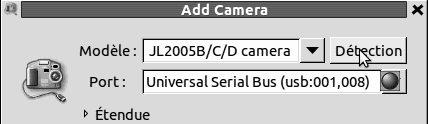
Click then on button: [Detect], it will automatically detect your camera (if it’s supported) :
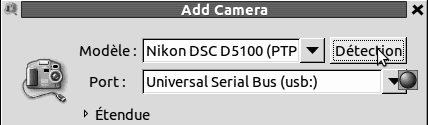
Click then on [OK].
You will need then to wait during few seconds, the libgphoto used by Gtkam initialize the camera and scan it’s memory card directories. You can see a progress-bar at the bottom og the main windows, you have to wait it finish this action before using the camera:

Then in the list you will see your camera, click with right mouse button and choose in the contextual menu the item [Capture image...]
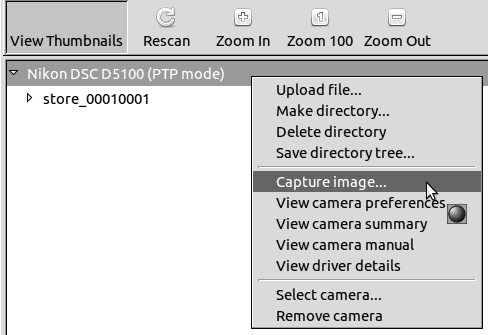
If your camera supporte liveview (remote viewfinder) in libgphoto, the you will see a realtime view of your viewfinder, like this one (I added this picture on Gtkam article on Wikipedia), else you will probably be able to capture a picture by clicking on the [Capture] button of this new window if your camera support remote capture (click on picture to zoom it) :
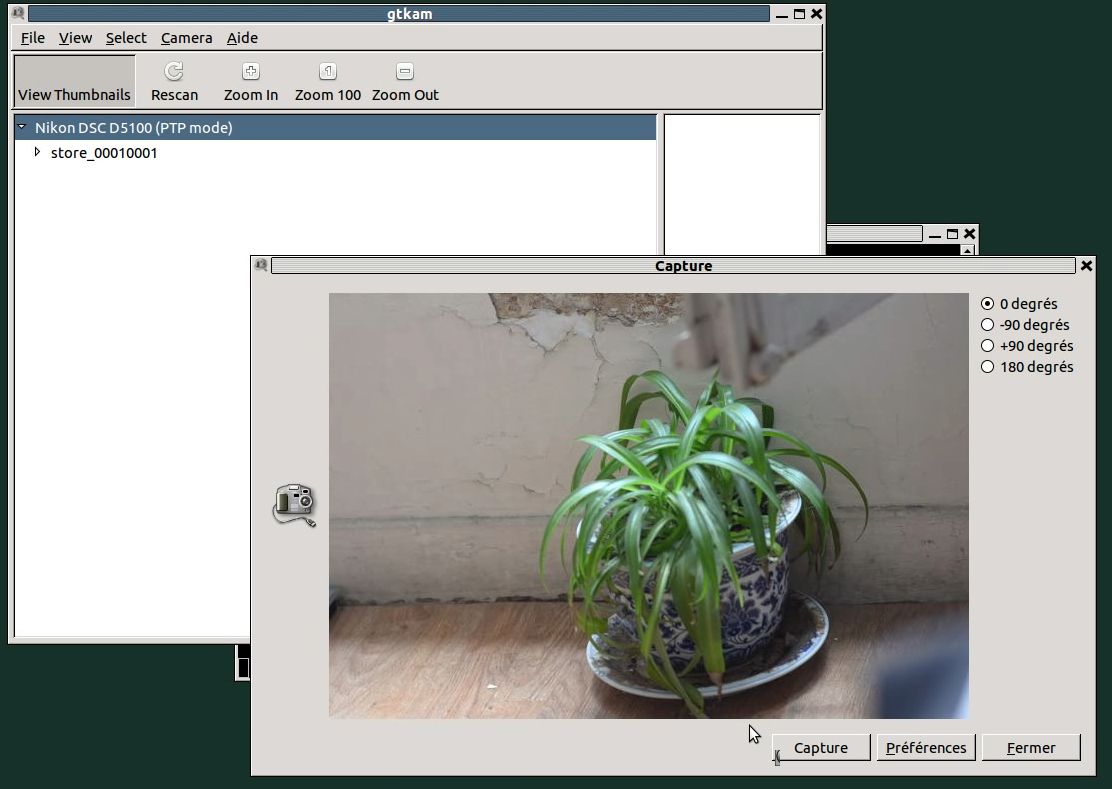
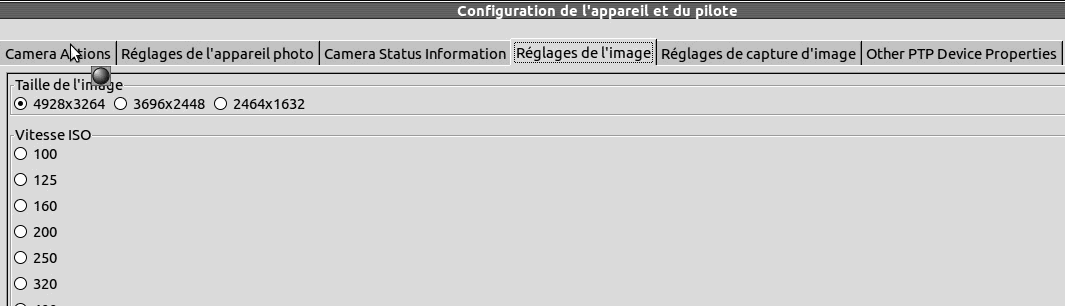
You will also be able to modify your camera settings for next capture by pressing the preferences button (display only if supported), or by rightclicking on camera on the list => bouton préférences de cette nouvelle fenêtre comme ici (cliquez sur l’image pour l’agrandir) => [View camera preferences] (will be gray if your camera can’t be remotly controled or if gphoto can’t do it.
MP4 / OGV:
Powered by WordPress


