
F-droid market (F-droid.apk)
Connectbot SSH client & telnet client (connectbot.apk)
Android Terminal Emulator (term.apk)
Octave and Gnuplot (octave.apk). Need Android Terminal Emulator
bash (no apk)
Comments Off
F-droid market (F-droid.apk)
Connectbot SSH client & telnet client (connectbot.apk)
Android Terminal Emulator (term.apk)
Octave and Gnuplot (octave.apk). Need Android Terminal Emulator
bash (no apk)
Comme on me le demande parfois, je fais un mini tuto en image pour installer le support du chinois sur Galaxy Note II. C’est plus simple que sur d’autres systèmes Android.
* Ajout du clavier chinois
* Afficher tout le système en chinois
* Envoie de SMS en chinois
Mise à jour 9 décembre 2012 : Le clavier (application libre) OpenWnn est un peu mieux que celui de Samsung où des caractères courants comme 龙 (dragon), manquent. Il permet la saisie ne chinois simplifié (méthode pinyin), chinois traditionnel (méthode bopomofo/zhuyin) et japonais (méthode hiragana).Lien f-droid.org, OpenWnn.apk.Fin de l’ajout
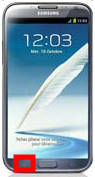
Depuis l’écran de démarrage, appuyer sur la touche en bas à gauche, en dessous de l’écran, touche menu :
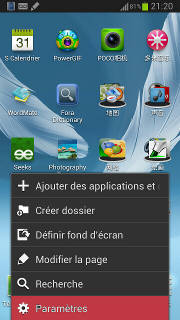
apparaît alors le menu suivant, où il faut choisir Paramètres :
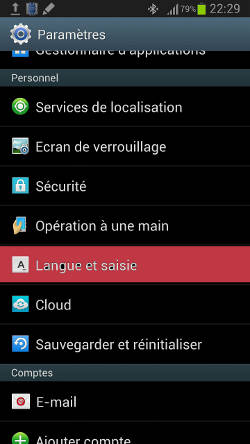
Puis, suivre la séquence suivante :
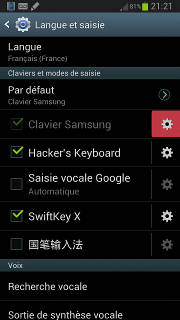
* Langue et Saisie :
* Engrenage à droite de Clavier Samsung (est remplacé par clavier Google en version chinoise ???) :
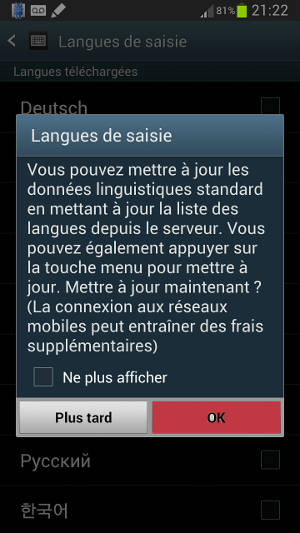
* Une alerte rappelant que vous pouvez mettre à jour les données linguistiques à tout moment, faites OK
* Une liste apparaît alors, ajouter 中文 en appuyant dessus :
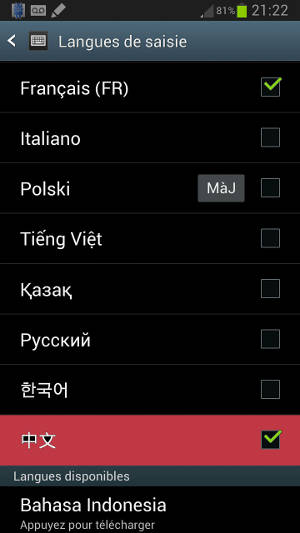
La petite icône [MàJ] à côté de Polski sur la capture d’écran signifie qu’une mise à jour est disponible pour le polonais, appuyer dessus mettra donc à jour cette langue.
Et voilà, le chinois est configuré. Vous pouvez sortir des paramètres en appuyant sur le gros bouton Home/maison situé en bas du téléphone, au milieu.
Il reste encore à l’utiliser. Allez pour faire apparaître le clavier de la langue courante dans n’importe quel endroit où vous pouvez saisir du texte, puis…
Pour changer de langue sur le clavier Samsung, il suffit de presser longuement sur la barre d’espace et de se déplacer à gauche ou à droite, plusieurs fois le mouvement dans la même direction peuvent être nécessaire si il y a plusieurs langues :
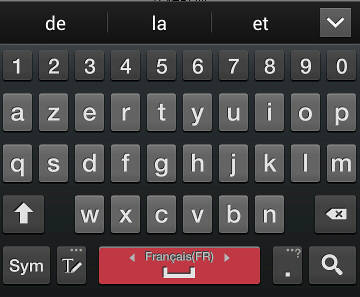
Et voila le mode pinyin chinois :
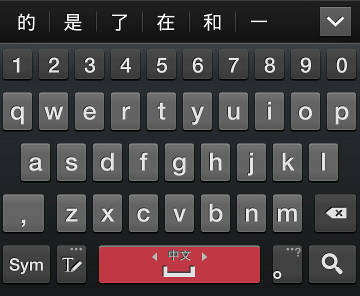
Vous pouvez également basculer en mode écriture manuscrite en appuyant sur le petit crayon à gauche de la barre d’espace :
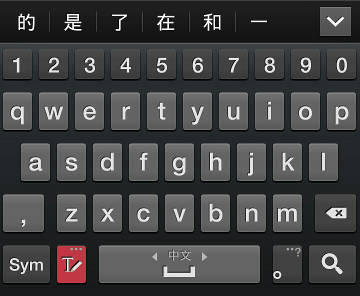
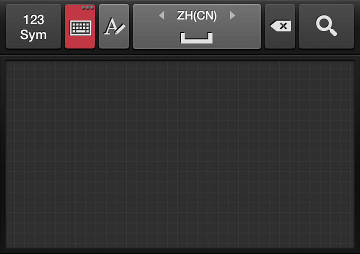
et depuis le mode manuscrit, pour repasser en mode pinyin, cliquer sur l’icône clavier :
Afficher tout le système en chinois
Si vous désirez ensuite que tout le système soit en chinois, il faut suivre la démarche suivante (qui commence comme la précédente) :
depuis l’écran de démarrage, appuyer sur la touche en bas à gauche, en dessous de l’écran, touche menu :
apparaît alors le menu suivant, où il faut choisir Paramètres :
Puis, suivre la séquence suivante :
* Langue et Saisie :
Choisir Langue :
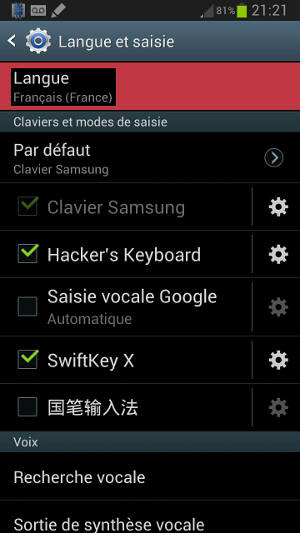
Descendre à 中文 (zhongwen), qui est dans les z :
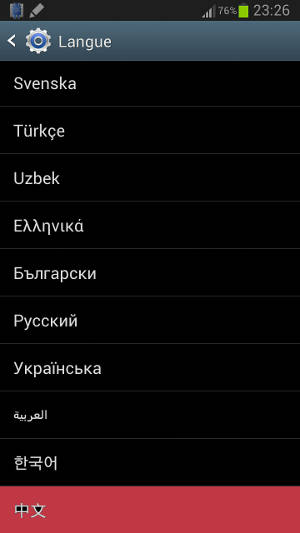
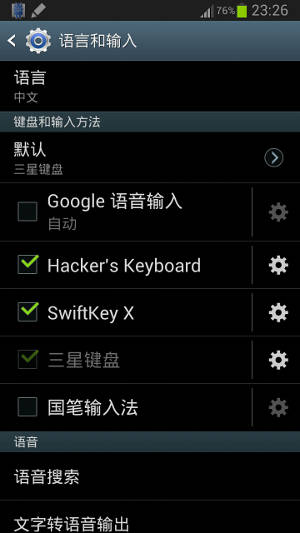
Et voila le système en chinois, ne paniquez pas si vous ne connaissez pas le chinois, appuyez de nouveau sur le premier bouton pour remettre en français. Attention, dans l’ordre des claviers clavier Samsung est remplacé par la saisie vocale Google (Google语音输入) et la méthode de saisie vocale est remplacée par le clavier Samsung (三星键盘)。
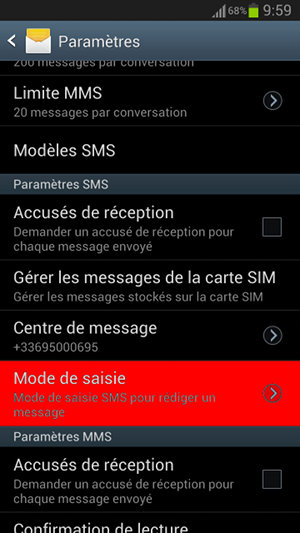
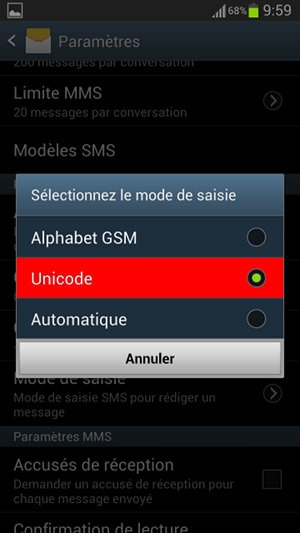
Par défaut, le réglage des SMS est bloqué sur un mode qui ne supporte que les caractères latin, du coup si vous écrivez à un contact en utilisant des écritures non latines, celui-ci lira des petits carrés à la place des caractères. Ce n’est pas le cas dans les applications de babillage ou courriel que j’ai pu tester.
Pour résoudre ce problème, il faut aller dans l’application « messages » (utilisé pour les SMS et MMS)
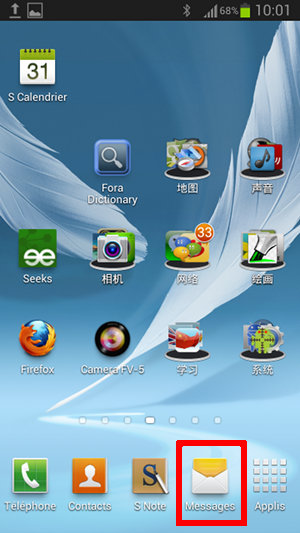
Appuyez ensuite sur le bouton menu de votre téléphone
Sélectionnez paramètres
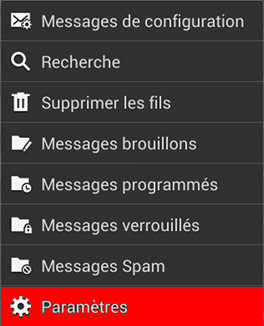
Puis dans la partie Paramètres SMS, pressez Mode de saisie
Puis choisissez Unicode. Il est possible qu’Automatique fonctionne aussi, je n’ai pas essayé.
Ça ne devrait poser moins de problème sur les autres versions de Linux, mais Ubuntu qui utilise sa propre interface, Unity et qui a décider au moment le plus adéquat de ne le mettre que via le support 3d, risque de se retrouver avec une surcharge de support considérable.
Il est possible depuis longtemps d’avoir plusieurs cartes graphiques fonctionnant ensemble, mais depuis 1 ou 2 ans, des nouvelles technologies, propriétaires, développés par les différents constructeurs sont apparues. Mais voila elles sont devenue la norme sur les ordinateurs portables compatibles IBM PC ou intel cet été.
Comme d’habitude dans le monde des technologies Intel et compatible IBM-PC donc, la concurrence prime sur la collaboration, chaque constructeur de carte graphique à décidé qu’il serait mieux de développer sa propre technologie dans son coin, sans se concerter et sans norme commune, résultat, ça fait perdre du temps et de à tout le monde, des constructeurs, aux utilisateurs en passant par les développeurs et administrateurs système.
* Le coût des cartes mère décuple pour supporter les technologies ATI, nVidia et Intel, comme tout le monde veut comme il est souhaitable pouvoir fonctionner avec les trois normes. Et ça augmente les e-déchets dans le cas des personnes ne trouvant pas de solution.
* Le coût du développement des pilotes augmente ; les constructeur sont obligé de faire des pilotes spécifique pour chaque systèmes, plus tous les cas de cartes mères et de combinaison de matériel qui est également tout récent et donc plein d’autres problèmes. Et les développeurs tiers qui veulent ne pas être bloqués dans les contraintes stupides de ces constructeurs également.
* Les administrateurs systèmes se retrouve avec ces nouvelles incohérences à gérer et d’avantage de chance d’avoir des problèmes d’incompatibilité.
C’est donc ce qui c’est passé hier avec la mise à jour d’un Ubuntu 12.04 vers un Ubuntu 12.10 d’un ami qui avait eu la mauvaise idée d’acheter du matériel trop récent. Au passage, on a pas réussi à comprendre comment Booter sur carte SD : Via lecteur interne pas vu dans le bios et lorsque on branche le lecteur de carte SD externe l’ordinateur fige (le bios fige immédiatement). Asus (un constructeur basé à Taïwan) est pourtant une bonne référence pour le matériel, ils fabriquent les cartes mères parmi les plus fiables, pour eux même et notamment leurs serveurs, mais aussi pour Apple, DeLL et pas mal d’autres.
Donc, on fait la mise à jour tranquillement tout en regardant d’autres problèmes système mineurs, dont l’importation du carnet d’adresse dans Thunderbird qui est aussi un problème amusant.
* Thunderbird utilise un fichier nommé .thunderbird/XXXXXXXX.default/abook.adb (ou XXXXXXXX est une suite de 8 lettres et chiffres au hasard) pour conserver le carnet d’adresse
* Comme a de l’humour, il peut importer pleins de format, mais pas celui-ci.
* Il faut donc, via l’interface, exporter le carnet actuel au format de son choix, remplacer le abook.adb actuel par l’ancien, puis réimporter le carnet puis exporter de nouveau au cas où ça redevient nécessaire.
l’impossibilité d’importer les carnet d’adresse Thunderbird depuis les fichiers d’une ancienne configuration
Lorsque l’installation s’est terminée, on a redémarré, et s’est retrouvé une fois l’identifiant passé, sans environnement de bureau…. Et oui, le double bon chois des constructeurs (technos non standard) + d’Ubuntu, passer coûte que coûte par l’interface 3d, sachant que de nombreux utilisateurs ont des problèmes aléatoires avec les pilotes à donné ça. Donc, là, si on ne connaît rien, on ne sait pas qu’on peut lancer un terminal via ctrl+alt+t ou passer à un des six terminaux texte via ctrl+alt+f1 à f6. On voit un écran avec uniquement la possibilité de modifier le fond.
La technologie qui pose problème étant dans ce cas Optimus (combinaison Intel + nVidia) et la solution, Bumblebee. Pour référence, la solution (en anglais) (Bumblebee sur Ubuntu et autres Linux)
Donc en quatres lignes :
sudo add-apt-repository ppa:bumblebee/stable
sudo add-apt-repository ppa:ubuntu-x-swat/x-updates
sudo apt-get update
sudo apt-get install bumblebee bumblebee-nvidia
Puis un petit redémarrage propre.
Au passage, cet ordinateur ayant un pavé numérique, il y a un problème de verrouillage du pavé numérique avec lightDM, il suffit de suivre ce didacticiel pour résoudre le problème.
La coopération entre la carte mère, les cartes filles et le système se passaient bien mieux et était automatique sur Amiga et pas mal d’autres systèmes il y a 15 ans.
Espérons que dans le monde ARM ou tout semble d’avantage basé sur des normes et de la coopération, et ou ça devient de plus en plus la norme dans le domaine des applications (au moins web) on ne tombe pas dans le même genre de pièges.
ça fait bientôt une semaine que j’ai un Galaxy Note II et au moins 6 mois que je l’attendais, lorsque les premières rumeur parlaient d’un possible SoC ARM équipé de Cortex A15. Cet été, il a finalement été annoncé comme ayant un Exynos 4412, donc CPU quadruple cœur Cortex A9 à 1,6 GHz, et GPU quadruple cœur Mali400 MP4(donc), plus des tas d’autres choses, il est relativement bien géré sous Linux pour ARM. Ubuntu 12.04 peut fonctionner dessus, je ne sais par contre pas si le matériel est supporté à 100 %, mais il bénéficie déjà de certaines accélérations.
Parmi les petites choses sympa qui avait déjà introduits dans les Exynos 4210 (générations précédentes), ainsi que les Apple Ax également fabriqués par Samsung : Le réseau de satellite russe GLONASS, il a visiblement des avantages et inconvénients par rapport au réseau US GPS, c’est donc bien de pouvoir se baser sur les deux pour plus de rapidité et de précisions.
Il ne manque donc plus que Galileo, le système européen (quelle Europe ?, je ne sais pas si c’est l’Union Européenne (incluant les colonies de Guyane en Amérique et de Polynésie en Océanie), la CEE (existe-t-elle encore ?), l’Espace Schengen, l’Europe géographique (incluant la Turquie ?) ou étatique (la Russie dont la capitale est en Europe géographique est elle en Europe ou en Asie ???) qui vient d’être lancé avec les premières fusées russes décollant en Guyane « Française » en Amérique du Sud et enfin běidǒu (北斗) 2, le système chinois.Les Chinois et Européens ont signé un accord de coopération en 2003.
Autres avancées, mais qui font très peur : reconnaissance de visage, vous mettez un nom sur un visage reconnu, son nom s’affichera sur la personne si vous la photographiez de nouveau. On ne sait pas dan quelle mesure ces informations sont envoyées aux serveurs (via champs EXIF des photos ou autres), pour les utilisateurs des réseaux sociaux. La technologie NFC arrive lourdement (un réseau sans fil de plus avec : Dent-Bleue (Bluetooth), 2G/3G, Wi-Fi, infrarouge et d’autres, de quoi faire bouillir un certain nombre de fois le cerveau et tous les organes baignant dans des liquides. Détecteurs de mouvement de toute sortes, de regard, de proximité, de lumière etc… Ces technologies ont été mise en place, mais officiellement pas activée sur les écrans publicitaires géants de Samsung envahissant les réseaux de transport publiques de la RATP et la SNCF. Il ne faut pas non plus oublié que Samsung, comme les deux autres plus gros groupes coréens (Daewoo et LG) sont aussi fabriquant d’armes pour le gouvernement de Corée du Sud (créations maisons ou sous licences d’armurier US).
Un point positif cependant les valeurs DAS continuent de baisser, elle à une valeur de 0,17 W/Kg (le Galaxy S I était à environ 0,6, pendant que les iPhone était à environ 1,6 W/Kg) et le Galaxy S II à 0,338 W/Kg. On revient donc aux niveaux des premiers téléphones cellulaires, les cellules cancéreuses ne remercient pas Samsung, nous si.
L’écran est fin, beau, grand, le stylet S Pen précis et rapide (technologie Wacom), et pas mal d’application gèrent la pression (S-Note, Markers (logiciel libre), Sketchbook mobile, Infinite painter et Drawing Pad, concernant le dessin/peinture numérique).
L’outil appareil photo/camera permet d’enregistrer en x8 accéléré et donc de rejouer en ralenti /8 :), c’est magnifique, ici quelques effets étrange dus à mon doigt collé à la lentille :
Cliquez ici pour télécharger l’exemple
La batterie tiens bien la route, en testant avec jeux, Wi-Fi, transferts, ça tient sans problème 2j et se recharge complètement en environ 2h. En utilisant bien les bon réglages, et gardant l’habitude de couper ce qui n’est pas utilisé parmi Wi-Fi, 3G, bluetooth, GPS, et en tuant régulièrement les applications Google qui se lancent en tâche de fond, on doit pouvoir atteindre facilement 1 semaine sans trop d’effort (ce que je faisait avec le Galaxy S I en ne poussant jamais autant les réseaux.
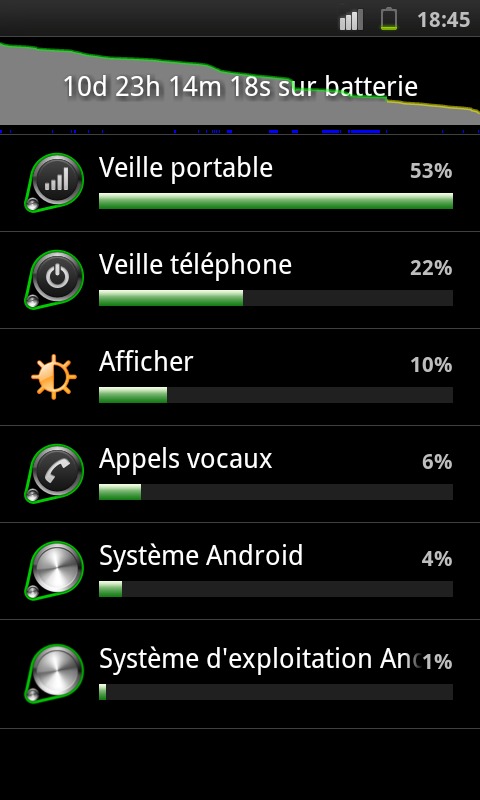
Attention, si le système s’étend volontairement lorsque l’on passe en dessous des 2 ou 3 % de batterie, il est bon de savoir que sur les batteries Li-on, passer en dessous de 10 % a tendance à user prématurément la batterie. Si cela vous arrive, penser à la recharger pleinement.
Android 4.1 (Jellybean) est très rapide et agréable dans cet environnement, pour moi qui était encore en 2.3, ça m’a fait pas mal de choses à apprendre et d’habitude à adapter, mais c’est globalement bien. mise à jour 25/11/2012 Au passage, la mise à jour de la Galaxy Note 10.1 amène également toutes fonctionnalités du Note 2
L’interface Touchwiz de Samsung et ses applet sont fantastiques et bien améliorée par rapport à celle du S I :
* Calendrier complet sans avoir besoin de compte Google (il alerte tout de même qu’il ne peut pas s’y synchroniser la première fois, on peut ensuite désactiver l’alerte).
* Les claviers internationaux de Samsung gérables indépendamment de la rom, on peut maintenant charger le chinois, le vietnamien ou des écritures indiennes, ou encore le Kazakh. Le japonais semble manquer par contre. Il gère maintenant la reconnaissance d’écriture pour le chinois et d’autres langues.
* Le gestionnaire de contact s’est un peu amélioré, nouvelles fonctions, plus belle présentation.
* les manipulations pour les déplacement des icônes sur le bureau sont plus intuitifs
* point noir, j’ai mis un bout de temps pour comprendre comment c’était apparu : un onglet arrondit bleu contenant des raccourci qui reste au dessus de toutes les applications (gênant pour taper au clavier entre autres) apparaît quand on presse longuement la touche retour. Refaire la même chose pour le faire disparaître.
* la possibilité de capturer l’écran n’importe où avec le stylet (dont une zone au lasso) qui sera copier dans le tampon, réutilisable dans toutes les applications. Appuyez par exemple sur le bouton du coté du stylet, puis pressez l’écran. Il y a en fait trois techniques pour les captures d’écran
* La possibilité (configurable) de lancer automatiquement Popup note (version fenêtre de S note) lorsqu’on sort le stylet du boîtier.
* Le fait de pouvoir avoir des applications en fenêtre (et non pas plein écran comme généralement le cas sur Android). La lecture vidéo et l’accès rapide s-note en sont des bons exemples.
* l’interface « commande rapide », permettant d’un simple caractère dessiné à main levée de lancer l’application de son choix (plus rapide que de cliquer sur n menus+dossiers+icônes).
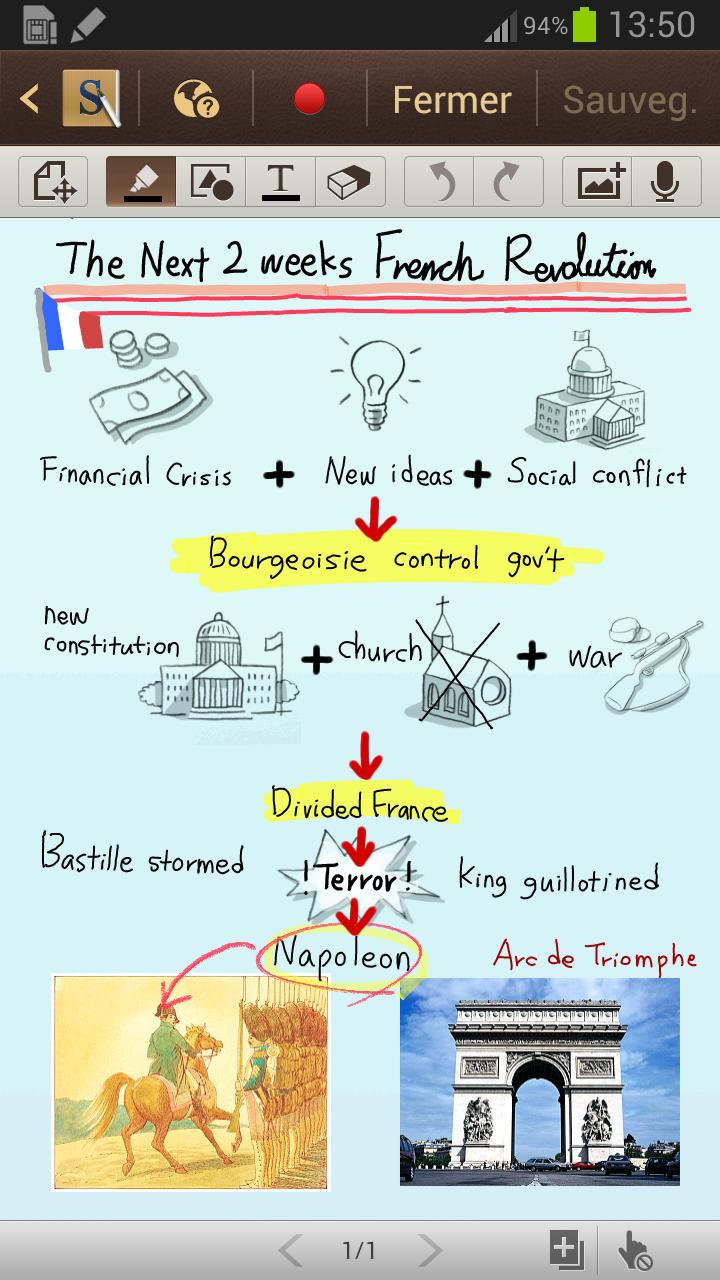
Positif :
* Il permet d’enregistrer la création de l’œuvre (appuyer sur le bouton rouge entre lancement et sauvegarde).
* Quelques outils pas mal sont présents et on peut sauvegarder les préréglages de ces outils dans la palette d’outils, c’est très pratique.
* Reconnaissance d’écriture manuscrite
* Reconnaissance de forme géométrique
* Reconnaissance de formule mathématique
* Possibilité de faire tourner agrandir déplacer les éléments introduits
* Clip-art (mais pas vraiment intéressant, pas compris comment on y ajoute ses propres clip-arts).
Négatif :
* Palette d’outil un peu longue à ouvrir (environ 1 seconde), il faut prendre l’habitude au début, c’est pénible (on re-clic croyant avoir mal appuyé, elle se referme du coup dès qu’elle apparaît).
* Je regrette que l’on ne puisse régler le niveau de transparence que sur le marqueur.
* Taille limitée à l’écran, on ne peut donc pas aller très loin dans les détails
* pas de gestion de calques.
* Format .snb ne semblant pas être documenté (à vérifier).
Les plus :
* mise à jour : J’avais mis que le clavier Google supportait maintenant le chinois avec reconnaissance d’écriture, il s’agit en fait du clavier Samsung (déplacé dans TouchWiz donc).
* Gestionnaire de tache, amélioré (presser pendant 2 secondes le bouton [home] => choisir le camembert, à gauche) permettant de voir la mémoire/processeur utilisé par les applications résiduelles :
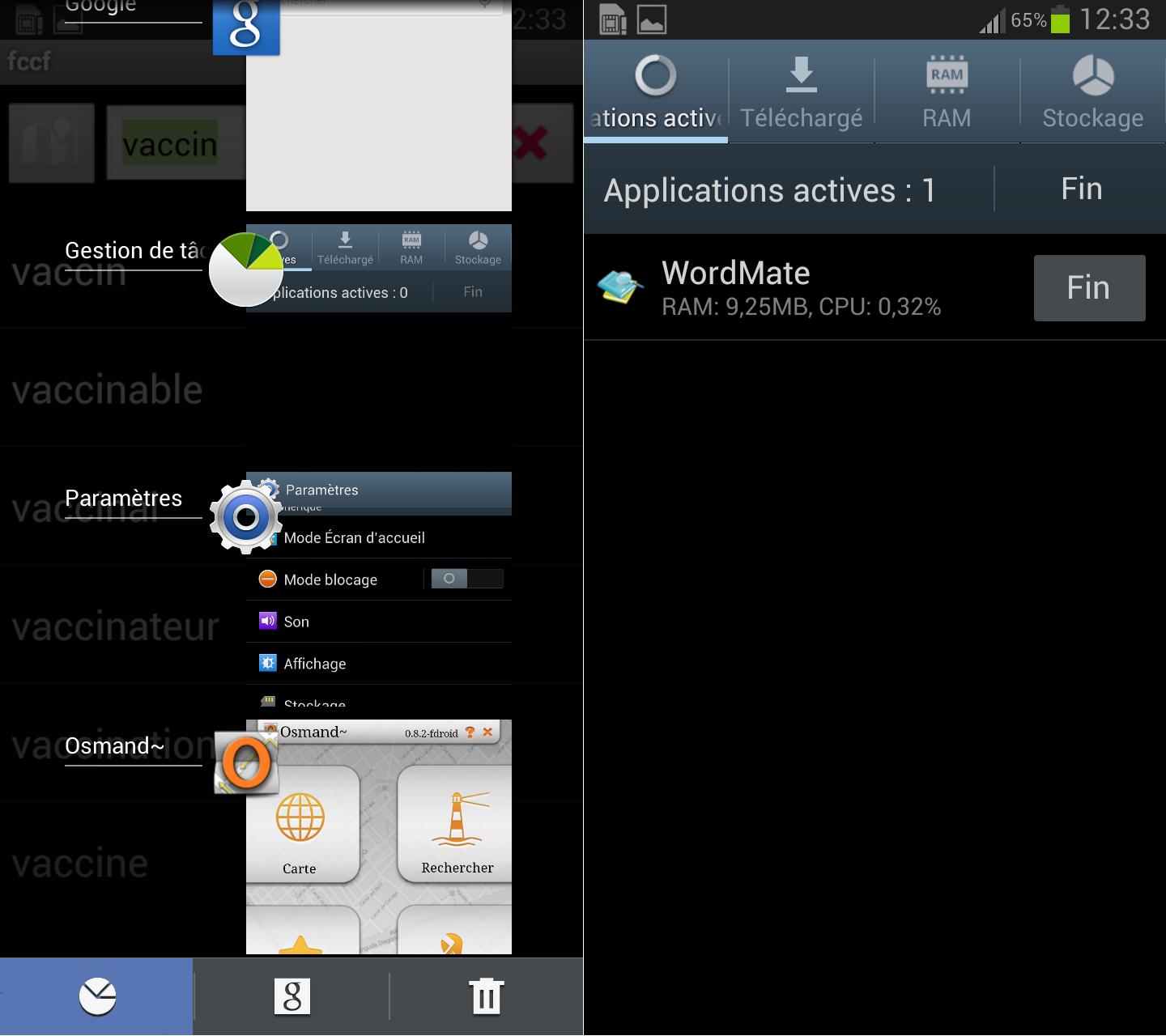
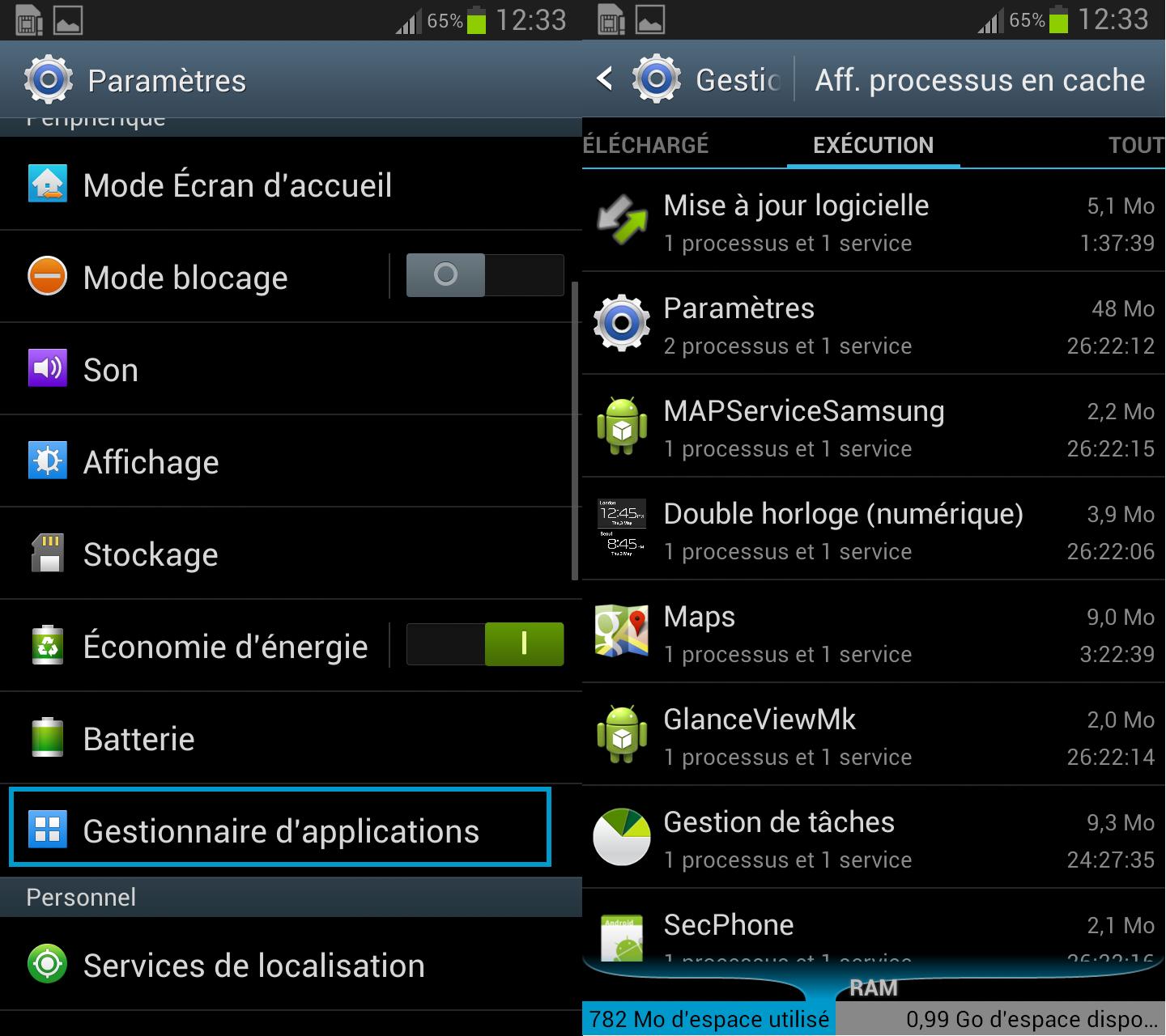
* Gestionnaire d’application montrant enfin (contrairement a celle de 2.3 qui n’était que l’équivalent de l’actuel « Gestion de tâche ») toutes les tâches qui tournent sans qu’on ne l’ai demandé (Google Maps, Google reconnaissance vocale, Google services, Google-je-prends-toutes-tes-infos-perso…).
* Chrome est fourni en plus du navigateur par défaut « Internet ». J’y préfère toujours Firefox et j’aurais préféré Chromium, mais ça peut être utile. Pensez à le tuer via le gestionnaire de tâche quand vous le quitter, il ne se ferme pas réellement tout seul.
Les points noirs de 4.1 :
* La reconnaissance vocale qui apparaît un peu trop (quand on clic sur le bouton du milieu (home), l’icône micro apparaissant alors juste au dessus). Si on la désactive dans la partie des méthodes de saisie, elle est tout de même relancée à la première imprécision de manipulation.
* La disparition (depuis la 4.0 apparemment) de l’UMS (mass storage), bien pratique pour pouvoir accéder au système de fichiers lorsqu’on le branche à l’ordinateur. On a seulement le choix entre MTP ou PTP maintenant (ils sont plus lents et moins souples), en plus du Kies propriétaire de Samsung.
* Copier via MTP out HTTP un APK, puis l’ouvrir via le gestionnaire de fichier pour l’installer, il enverra une alerte, il suffira d’autoriser les applications tierce non-signée pour les installer (plus simple que de passer par le kit de développement).
* Ghost Commander (Ghost commander et plugins APK) contient des greffons (plugins) SFTP (secureFTP, protocole associé à SSH) et Samba (partage Windows), il est pratique à indispensable donc, surtout sans mass storage.
* Firefox semble mieux séparer la barre d’URL de sa fonctionnalité recherche, sur “Internet” (le navigateur par défaut), c’est un cauchemar anti-confidentialité.
* Le Bluetooth semble bien fonctionner depuis Android vers un Linux plus standard, avec un dongle USB Bluetooth 2.1 Advence acheté 6€, immédiatement utilisable à la première insertion, grâce à l’intégration de Blueman applet au bureau XFCE. Par contre, c’est la première fois que j’utilise Blueman, j’arrive à recevoir, mais pas encore compris comment envoyer, ça m’a tout de même dépanné pour les médias de cet article.
* Outil mass storage sur XDA dev
En mettant à jour récemment Chromium (la version libre de chrome) sous Ubuntu, je me suis retrouvé avec la version 20 qui supporte enfin WebGL, auparavant, seul Firefox me permettait d’utiliser WebGL. Comme j’utilise le pilote libre Mesa et le processeur graphique (GPU) intégré Intel HD 3000 intégré APU (non commercial pour les SoC mal finis de technologie x86), il y a pour le moment des limitations. Mesa est en retrait des autres pilotes au niveau de la compatibilité OpenGL et OpenGL ES (à l’origine à destination de l’embarqué, ES=Embedded System, signifiant système embarqué).
Dans les versions 7.x la compatibilité OpenGL 2.x était présente.
En Mesa 8.0 sorti le 9 février 2012, on atteignait à peu près la compatibilité OpenGL 3.0, globalement stabilisé en mai après avec la 8.0.3, la 8.0.4 finissant la stabilisation en juillet 2012. En Mesa 9.0 (quasi stable) qui devrait sortir officiellement ce mois ci (septembre 2012) ou en début de mois prochain, on atteint la compatibilité OpenGL 3.1 et presque complète 3.2 et 3.3 avec des bouts d’OpenGL 4.x. Sur la tronc de développement, des bouts d’OpenGL ES 3 commencent également à être implémentés, une évolution d’OpenGL ES reprenant les améliorations d’OpenGL 3 et 4. On a toujours des gros bugs niveaux textures (notamment entre mode textures compressées et non compressées avec le simulateur de vol libre Flightgear) et reconnaissance sur différentes applications (un patch publié aujourd’hui résoudra peut être ce problème ?).
Depuis environ un an ça avance donc beaucoup plus vite, mais il y a encore du retard à rattraper, j’estime au pifomètre (avec une grosse marge d’erreur), en voyant les évolutions, qu’il y en a encore pour environ un an ou un peu plus pour rattraper le retard.
La mémoire graphique utilisé par le processeurs graphiques (GPU) étant toujours finie et donc limitée, on a intérêt à compresser les textures afin de gagner de la place et d’éviter de transférer les grosses textures depuis la mémoire vive de l’ordinateur, tache longue, d’autant plus que cela ralentie le transfert des données fondamentales, coordonnées des objets, rotation, transformations etc…. et que pour le GPU, la décompression de ces textures est un calcul plutôt léger voir négligeable. Le Taïwanais S3 à mis au point il y a quelques années cette technique et le format de texture compressé DDS (DirectDraw Surface). C’est devenu un standard de fait, mais le logiciel est breveté, obligeant dans les pays ayant eu la mauvaise idée d’autoriser le brevet logiciel (notamment États-Unis d’Amérique et Japon, on y échappe pour le moment en Europe) à en limiter l’utilisation, ralentissant ainsi les progrès techniques. Heureusement, la norme OpenGL 4.x introduit une méthode non-brevetée de compression et compatible.
Voici un exemple de textures compressées, si cela ne fonctionne pas chez vous pour le moment, lisez le reste de l’article :
http://media.tojicode.com/webgl-samples/dds.html
WebGL est un standard de représentation 3D dans les pages web au format HTML5, basé sur le standard OpenGL ES 2.0, lui permettant d’être adaptable sur le matériel embarqué, comme les tablettes ou téléphones mobiles. Il y a déjà eu différents essais de normes qui ont eu un succès très limité. Mais aujourd’hui WebGL est relativement mature et supporté par tous les navigateur répandus (Firefox, Chrome et Chromium, Opéra, Safari, …), à l’exception, comme d’habitude, de Microsoft Internet Explorer. Il le supportera probablement, comme à son habitude avec les standards, sans doute plus ou moins bien d’ici 1 ou 2 ans. On y est maintenant habitué et il perds, pour cela jour après jour des parts de marché. Il avait 75 % de part de marché il y a quelques années, et est encore 2e navigateur derrière Chromium (27 %), avec environ 23 % selon les statistiques d’août 2012 de Wikipédia, ce qui est encore trop, suivi par Firefox avec 18 %). Wikipédia étant le 5e site le plus visité au monde, cela donne une bonne idée de la répartition des navigateurs.
Google a également crée Google Chrome Frame qui permet d’utiliser du vrai HTML5 avec Internet Explorer.
WebGL à l’avantage d’être un standard ouvert et libre (sans contraintes d’utilisation), et d’être quasiment similaire à OpenGL ES, OpenGL étant le premier et principal standard de 3d, utilisé par 99% des téléphones et autres matériel, la majorité des consoles de jeux et les ordinateurs (Windows utilise également Direct3D, qui est un peu plus lent et plutôt fermé).
Firefox un navigateur ouvert et relativement libre (restriction au niveau du nom ayant poussé à des dérivés IceWeasel et autres), dérivé de Mozilla, lui même dérivé de Netscape fût pendant longtemps le principal navigateur web. détrôné par IE pendant quelques années sous Windows et maintenant par Google Chrome plus généralement.
Google Chrome est le navigateur fermé de Google (qui refile, comme Apple et Microsoft) toutes vos infos confidentiels aux services secrets des États-Unis d’Amérique et a quelques autres sociétés contre un peu d’argent. Google Chromium est quand à lui une version ouverte et libre.
Mozilla Firefox comme Google Chromium ont tous deux pleins d’outils espions (ou fonctionnalités) Google intégrées, Dans Firefox, il suffit de taper dans la barre de navigation : about:config pour nettoyer la majorité, et de désactiver Google dans les moteurs de recherche (et remplacer par une occurrence de votre choix de Seeks) (local ou un des nombreux nœuds existants. Sous Chromium c’est encore plus dur, mais on peut aussi supprimer les moteurs Google et limiter les dégâts.
Sortons du thème du contre-espionnage et venons en à ce qui me motive pour ce billet. Firefox et Chromium se font une guerre effrénées aux meilleurs performances, pour notre plus grand bien. Chromium à toujours était globalement plus gourmand en mémoire, mais à eu l’avantage dès sa sortie d’être multi-thread (se répartissant bien sur les différents processeurs, plus de réactivités lors qu’un des onglets de réagit pas, etc..) et surtout plus rapide. Firefox l’avait largement devancé en performance mono-thread (pour javascript avec le test Sunspider 9.1) en début d’année, mais était toujours moins réactif du fait de son fonctionnement globalement monothread. Il y a quelques mois, il est devenu mono-thread, explosant ainsi Chromium au tests JavaScript. Chromium 20 a comblé son retard et même devancé Firefox. il utilise maintenant autant de cœurs de processeurs en parallèle mais de façon plus légère tout en étant plus rapide. 15 s pour chromium 20 contre 25 s pour firefox 15 au test Sunspider 9.1. Les versions suivantes de Sunspider seront un peu modifiée pour avantager Chromium sur des fonctionnalités non standard{{refnec}} et ne seront donc pas intéressant pour les tests.
Chromium 20 supporte enfin WebGL sur mon système mais il pose encore quelques problèmes.
Avec Firefox jusqu’à 15 (paquet Ubuntu ou Mozilla standard) et avec Chromium 20 (paquet ubuntu 12.04 standard) fonctionnent mais ne supportent pas les textures compressées avec Mesa et GPU Intel. il faut pour contourner se problème régler la variable d’environnement force_s3tc_enable=true avant de lancer l’un de ces navigateurs.
Firefox 16 (actuellement beta4) supporte les textures compressées indépendamment, je ne sais pas pourquoi, je soupçonne une décompression soft, il faut que je cherche, dans ce cas, on aurait avantage à également utiliser le flag, plutôt que de le lancer et d’avoir un ralentissement des applications.
Chromium 21 et 22 (récupérés sur des PPA) ne considèrent plus que mon GPU supporte WebGL, il faut donc lui forcer la main avec l’option : --ignore-gpu-blacklist et tout fonctionne bien.
J’ajoute à chrome une autre argument : --no-sandbox qui permet d’éviter que celui-ci soit lancé en SUID (root) et expose ainsi à tout le web des failles de sécurité béantes à mon système.
Donc, pour le côté pratique je réuni tout ça dans un script qui peut être appelé en ligne de commande ou dans l’interface graphique du système :
#!/bin/bash
force_s3tc_enable=true /usr/bin/chromium-browser --no-sandbox --ignore-gpu-blacklist $1
J’appelle ce script /usr/bin/chromium3d et lui donne les droits d’exécution (chmod +x /usr/bin/chromium3d. le $1 lui permet de récuperer le premier argument (l’URL lorsqu’on click sur un lien où l’ajoute sur le ligne de commande).
Maintenant, le FPS Bananabread devrait fonctionner chez vous
Powered by WordPress


